Salon commission & staff pay software
Salon commission and staff pay, calculated for you
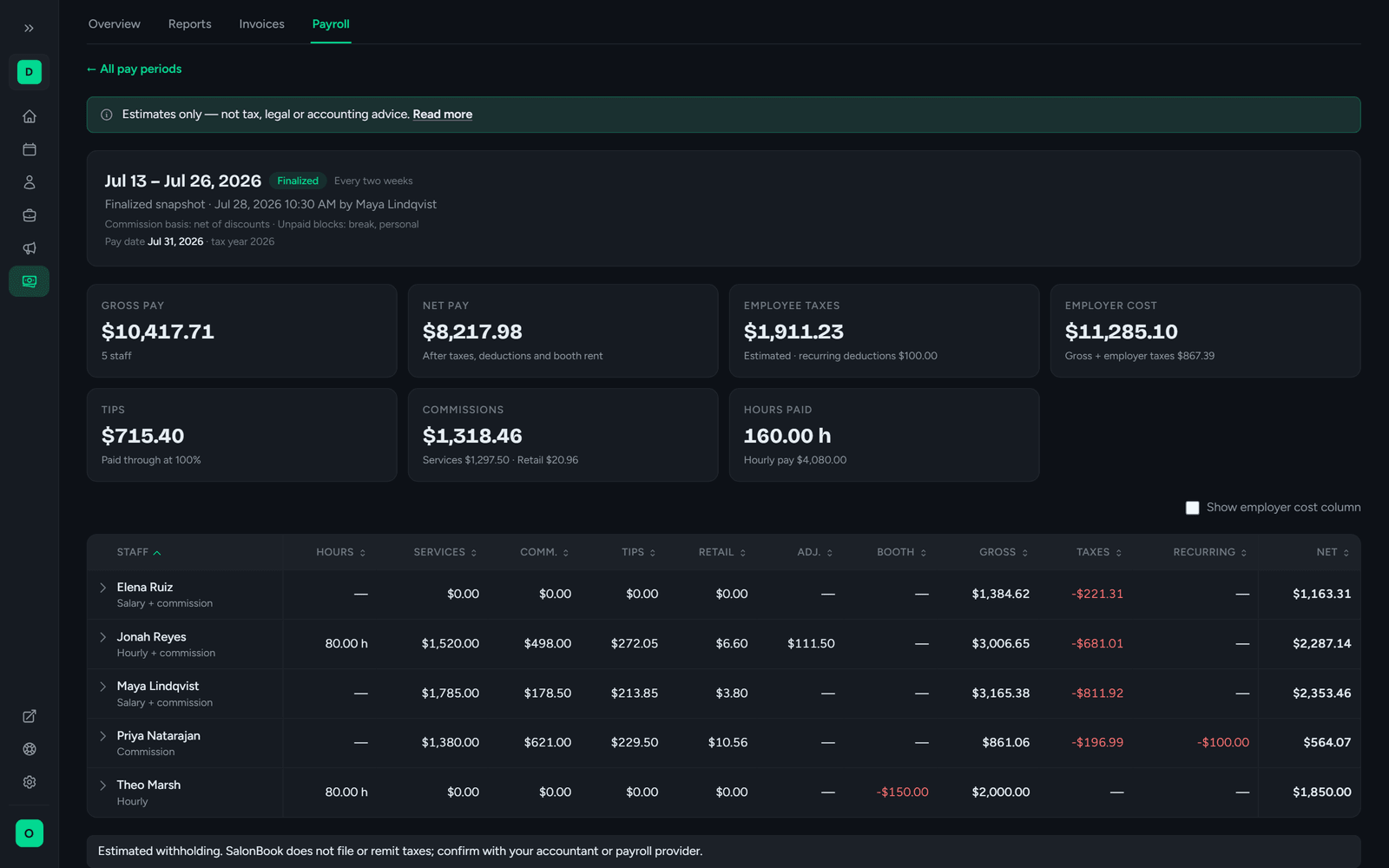
SalonBook totals each person’s completed services and add-ons, tips from paid invoices and the retail sales credited to them, applies their pay plan (commission tiers, hourly, salary or a mix) and hands you a pay period to review, adjust and finalize.
Payroll is included in Enterprise: $89/month, or $69/month billed annually. It isn’t available on Free or Pro.
How a pay period works
The appointments, tips and sales are already in SalonBook. Payroll turns them into pay.
- 1
Set each person’s pay plan
Commission, hourly, salary, or hourly or salary plus commission. Add a retail commission rate and, for renters, booth rent.
- 2
SalonBook pulls in the work
Completed appointments (add-ons included), tips from paid invoices and each person’s retail sales are totalled for the period. Hourly hours come from staff schedules.
- 3
Review and adjust
Override hours, add a bonus, record an advance or a backbar charge, and credit any unassigned retail sales before you close the period.
- 4
Finalize and export
Finalizing locks a snapshot of the period. Export the CSV for your accountant, and your team sees their pay stubs in My Pay.
Pay plans & commission tiers
Every way your salon pays people, set per person
One stylist on straight commission, a front-desk lead on hourly, a manager on salary plus commission. Each team member gets their own pay plan, and commission can be a flat rate or tiered.
- Commission, hourly, salary, hourly + commission or salary + commission
- Flat or tiered commission, as a sliding scale or as brackets
- A separate retail commission rate on any pay type
- Optional booth rent, deducted each pay period
Every dollar explained
Open any line and see where the money came from
Each person’s line opens into a pay stub: hourly or salary pay, commission, tips and bonuses, the estimated taxes and deductions taken, and net pay, with year-to-date totals beside the current period. Below it are the completed appointments and add-ons behind their commission, the tips from paid invoices and the retail sales credited to them.
- Earnings, estimated taxes, deductions and net pay, with year-to-date totals
- Bonuses, advances, backbar charges and other deductions, itemized
- Estimated employer taxes and total labor cost, for managers only
- The appointments, tips and retail sales behind every figure
Staff pay stubs
Your team sees their own pay, and only theirs
Once a period is finalized, each tech can open My Pay to see their pay stub, with year-to-date totals, and print it. Managers see the whole team. Employer costs are never shown to staff. Stubs are estimates, not official pay statements, and may not meet your state’s wage-statement requirements.
- Finalized pay stubs in My Pay, ready to print
- Year-to-date totals on every stub
- Techs see only their own pay; managers see everyone
- Marked as an estimate: not an official pay stub or tax document, and it may not meet your state’s wage-statement rules
Tax estimates & labor cost
Estimated withholding and an estimated labor cost per person
Turn on tax estimates (they’re off until you do) and SalonBook estimates employee withholding and employer taxes for every pay period, then rolls the year up into a summary you can export. Your accountant or payroll provider uses those totals to prepare the official W-2 and 1099 forms.
- Mark each person as W-2 or 1099 (you decide; SalonBook doesn’t classify workers)
- Social Security and Medicare estimated automatically, including the wage cap and the additional Medicare tier
- Federal, state and local withholding as a percentage or a flat amount
- Employer FICA, FUTA and SUTA estimates, for a total labor cost
Built around how salons pay
Commission tiers, tips, retail, booth rent and the odd advance, in one pay period. Payroll works from the same appointments, invoices and sales as the rest of SalonBook. See every SalonBook feature.
Sliding scale or brackets: an example
Say a stylist earns 40% on service revenue from $0 and 45% from $5,000, and books $6,000 in a pay period. You choose, per person, how the tiers apply.
- Sliding scale
- The tier reached applies to all of it: $6,000 × 45% = $2,700
- Brackets
- Each slice at its own rate: $5,000 × 40% + $1,000 × 45% = $2,450
Any pay schedule
Weekly, every two weeks, twice a month, monthly, or a custom date range. Salary is prorated automatically when a period is shorter than usual.
Finalize, reopen, keep the history
A finalized period is locked. Reopening it needs a reason, and the period keeps its full history.
Hours from the schedule
Hourly pay uses staff schedules minus breaks and unpaid time blocks, and a manager can override the hours for any period.
Retail credited to the seller
Retail sales count toward whoever sold them. Unassigned sales show up in the review for a manager to credit.
Recurring deductions with a goal
Set up a recurring deduction, such as paying back an advance, and SalonBook shows the remaining balance each pay period until it’s paid off.
CSV for your accountant
Export a summary or a detailed CSV for every pay period, plus a year-summary CSV.
What payroll does, and what it doesn’t
SalonBook payroll does
- Calculates what each person earned for the pay period, from the work recorded in SalonBook
- Applies commission tiers, hourly, salary, tips, retail commission, booth rent and manager adjustments
- Estimates employee withholding and employer taxes, if you turn tax estimates on
- Gives each tech a printable pay stub with year-to-date totals, marked as an estimate rather than an official wage statement
- Exports summary, detail and year-summary CSVs
It doesn’t
- Pay anyone: there’s no direct deposit, and no money moves through SalonBook payroll
- File or remit payroll taxes, or produce W-2, 1099, 941, 940 or state forms
- Give tax, legal or accounting advice, including whether someone is a W-2 employee or a 1099 contractor
- Promise exact tax amounts: every tax figure is an estimate
- Track time with a clock-in: hourly hours come from staff schedules
- Calculate overtime or check pay against minimum-wage rules
- Sync with a payroll provider: you export the CSV and hand it over
In plain terms: SalonBook calculates pay and estimates taxes. It doesn’t run payroll, pay employees, move money, or file or remit taxes or tax forms, and it isn’t tax, legal or accounting advice. Review every pay run with your accountant or payroll provider.
Payroll in SalonBook is a calculation and record-keeping tool. Figures are estimates based on the pay rules, hours, sales and rates you enter. SalonBook does not pay your staff, move money, or withhold, deposit, file or pay any taxes or tax forms, and does not provide tax, legal, accounting or employment advice. Review every pay run with a qualified accountant or licensed payroll provider before paying anyone.
Salon payroll questions
Does SalonBook pay my staff or offer direct deposit?
No. SalonBook calculates pay and estimates taxes. It doesn’t run payroll, pay employees, move money, or file or remit taxes or tax forms, and it isn’t tax, legal or accounting advice. Review every pay run with your accountant or payroll provider.
Which SalonBook plan includes payroll?
Payroll is part of the Enterprise plan. It isn’t included on the Free or Pro plans. The pricing page has the current Enterprise price, and paid plans start with a free trial.
How does SalonBook calculate commission?
Each team member’s commission is a flat percentage or a set of tiers. Tiers work either as a sliding scale, where the tier their service revenue reaches applies to all of it, or as brackets, where each slice of revenue is paid at its own rate. Commission is calculated on gross service revenue or on revenue net of membership discounts, depending on your salon setting (net is the default), and retail sales can earn their own commission rate.
How are tips handled in payroll?
Tips are credited 100% to the tech who earned them. SalonBook takes them from paid invoices, so a tip appears on the pay stub alongside commission and any hourly or salary pay.
Does SalonBook calculate payroll taxes?
Only as estimates, and only if you turn tax estimates on (they’re off by default). SalonBook can estimate Social Security and Medicare, federal, state and local withholding, and employer FICA, FUTA and SUTA, which gives you an estimated total labor cost. It doesn’t file taxes or produce W-2 or 1099 forms.
Where do hourly staff hours come from?
From each person’s schedule in SalonBook, minus breaks and unpaid time blocks. There’s no time clock, so a manager can override the hours for any pay period before finalizing it.
Can my staff see their pay?
Yes. Once a pay period is finalized, each tech can open My Pay to see and print their own pay stub with year-to-date totals. They can’t see anyone else’s pay or the employer’s costs. Managers see the whole team. The stub is an estimate, not an official pay statement or tax document, and it may not meet your state’s wage-statement requirements.
Can I change a pay period after finalizing it?
Yes. A manager can reopen a finalized period, but has to give a reason. SalonBook keeps the full history of each period, so you can see when it was finalized, reopened and why.
How do I get payroll to my accountant or payroll provider?
Export the pay period as a summary or detailed CSV, or export the year summary as a CSV, and send it over. SalonBook doesn’t connect to payroll providers directly.
Work out your next pay period in SalonBook
Payroll is included in Enterprise, with a 14-day free trial and no contract.